
Service commands are called using a smarty_manage script and are designed to perform certain regular and system tasks, such as updating EPG or deleting outdated data. Some commands are mandatory for the proper functioning of the service.
Instead in the commands, specify your configuration file, which is located at the address /etc/microimpuls/smarty/.
Common teams
Cache update
Team:
smarty_manage flushall --settings=settings.
In Smarty there are two types of cache:
- protected cache is data that is recorded in the cache for the sake of speed access to them and is not subject to cleaning when updating: content viewing marks, video server keys, etc.
- regular cache – temporarily stored data to speed up the system: saved API responses from the server.
Default command flushall it only cleans the regular cache.
Parameters:
-flush-protected - for forced cleaning of the protected cache.
smarty_manage flushall --flush-protected --settings=settings.
Testing system performance
Team:
smarty_manage performance_test --settings=settings.
Verification is carried out depending on the selected purpose of testing:-redis speed of writing, reading and deleting data.--database speed of creating and reading data.-proc - time of sorting the data array.
After performing the tests, the execution time of each test with the selected data size and the approximate number of requests / operations per second (rps) are output.
Parameters:-small performance testing is done with a small amount of data.-m,mid performance testing is carried out with an average amount of data.-b, big performance testing is done with a lot of data.-r, -redis if this flag is present, a redis check will be carried out.-db If this flag is present, the database will be checked.-p, --proc if this flag is present, the performance of the processor will be checked.-a a full system inspection flag (includes) -r, db, -p).
Examples of team use:
Processor load test with a lot of data:
smarty_manage performance_test --proc --big --settings=settings.
/usr/share/microimpuls/smarty-lite/manage.py performance_test -proc -big -settings=settings.smarty-lite
Processor test
Sorting values in test list..
time: 242.4418 22914546.2145 rps
A full load test with an average amount of data:
smarty_manage performance_test -a --mid --settings=settings.
/usr/share/microimpuls/smarty-lite/manage.py performance_test -a -mid -settings=settings.smarty-lite
Redis test
Setting value in redis..
time: 47.9694 10423.3085 rps
Receiving values from redis..
time: 46.3872 10778.8313 rps
Deleting values from redis..
time: 46.2279 10815.9741 rpsDB test
Creating value in db table..
time: 1.3785 362.7209 rps
Receiving values from db table..
time: 6.4660 7732.7368 rpsProcessor test
Sorting values in test list..
time: 59.1231 23489591.2796 rps
Creating a dumpfile for PostgreSQL
Team:
smarty_manage dump_db_to_psql -o dumpfilename.psql -s smarty_psql --settings=settings;
The team creates a dump file of the current Smarty database for PostgreSQL.
Parameters:
-s (--psqldb) The name of the database in the PostgreSQL server.
-o (-dumpfile) - the name of the file in which the dump of the current Smarty database will be recorded.
Subscribers
Write-off/renewal of accounts using built-in billing according to settlement periods
Team:
smarty_manage check_accounts --settings=settings.
The team deactivates accounts for which the settlement period has come to an end, as well as debits funds and renews existing accounts. It is recommended to start every night (see para. Description of the built-in billing).
Extension of Integrated Theatre External Billings for Simple Billing Logic
Team:
smarty_manage check_video_subscriptions -settings=settings.
The team is needed to support the current state of external subscriptions for cinemas in Smarty: checks internal subscriptions and, if necessary, renews external subscriptions. If the internal subscription is over, the external subscription is extended, the internal subscription is recreated. If external subscriptions are duplicated, the duplicate is deleted. The team passes on all subscriptions to the external cinema on the Smarty side (internal tariffsubscription objects in the django-admin Smarty) and, if necessary, renews them on the cinema side (external billing at the START, Viju and MEGOGO cinemas). Subscription on the cinema side is created with a margin of 1 day relative to the subscription within Smarty, so that this management team is guaranteed to have time to work out and renew the cinema subscription before it ends. If a subscription (or subscription) was added to the integration with the cinema after it appeared at the subscriber, then during the work of the team it will open on the cinema side, i.e. all missed external subscriptions will be created.
It is recommended to run the command at least 1 time per day, and in the case of using the command check_accounts - launch a team check_video_subscriptions right after her.
Delete all authorization sessions of all accounts for a given Client ID
Team:
smarty_manage delete_authkeys --client_id= --settings=settings.
Attention, executing the command will lead to the logout of all devices.
Clearing the subscriber's action log
Team:
smarty_manage clear_customer_log --days=60 --settings=settings;
Parameters:
-days this option is mandatory and determines that when calling a command, records older than days will be deleted.
Payments
Autopayment team
Team:
smarty_manage make_autopayments --settings=settings.
Makes payments for those customers who have active auto payment. It is recommended to perform directly in front of the team check_accounts.
Parameters:
-use_pool - includes multi-threaded processing of customer auto payments.
Payment validation team
Team:
smarty_manage check_payment_status --settings=settings.
Checks payment status for payment systems that do not have automatic notification. Fortebank and Payture are currently supported.
Parameters:
-timeout_minutes the number of minutes after which the payment is considered “obsolete” and is no longer verified.
Communications
Sending information messages to device screens and e-mail about the approach of the deactivation period / payment requirement
Team:
smarty_manage send_activation_expires_messages --client_id= --days_count= --settings=settings.
Parameters:
-days_count this parameter is mandatory and creates a sample of accounts, the period before deactivation of which is equal to the transmitted parameter.
-send_sms When specifying this parameter, messages will also be sent by SMS in case the subscriber has a phone number. It is recommended to run this command once a day.
Example of using a command:
Sending an SMS notification about the imminent approach of deactivation of accounts with the Client with ID=25:
smarty_manage send_activation_expires_messages --client_id 25 --days_count 3 --send_sms --settings=settings;
Deletion of old undelivered information messages
Team:
smarty_manage clean_old_messages --days_count<—hours<—minutes<—settings=settings.
With the help of this command, you can remove messages of a certain age that are irrelevant. Both delivered (without the “Delete After Reading” flag) and unread messages will be deleted. Deletion takes into account the date of creation of the message. If you specify several parameters, the period is summed depending on the transmitted parameters.
Warning: unless -days_count when executing a command, the default parameter is taken.
Parameters:
-days_count Responsible for deleting messages created by X or more days ago. By default 7.
-hours Responsible for deleting messages created by X or more than hours ago. By default 0.
-minutes Responsible for deleting messages created by X or more than minutes ago. By default 0.
Example of using a command:
Delete messages that were created more than 3.5 hours ago:
smarty_manage clean_old_messages --days_count=0 --hours=3 --minutes=30 --settings=settings;
Re-sending SMS messages not delivered the first time
Team:
smarty_manage resend_sms --settings=settings.
It is recommended to run the command every 1-3 minutes. Not all SMS gateways are supported.
Recovery of communications
Team:
smarty_manage restore_messages --settings=settings.
A command can be called if messages do not reach users or, for example, if a Redis drops. It can be used separately from flushall.
Content
Caching the list of channels for subscriber devices
Team:
smarty_manage cache_channel_list --settings=settings.
Parameters:
-content_type It is designed to separate caching of cameras and channels. Possible values: all, camera, channel. By default all.
It is recommended to run this command every minute. With an empty cache of the list of channels, the subscriber will be given a message that the list of channels is empty.
Creating a selection of popular TV channels
Team:
smarty_manage create_channel_selection_by_popularity --settings=settings;
Warning: for the work of this team it is necessary to configure tv viewing statistics module.
Parameters:-client_id This option is mandatory and determines the Client identifier for which the selection will be created.-days_number this parameter is mandatory and determines the number of days during which you should take into account television viewing.- criterion This parameter is mandatory and determines the characteristic on which the selection will be created. Possible values: watch (total channel viewing time), watch_sessions (number of channel viewing sessions), average (average channel viewing time), median_watch_time (median viewing time).-devices parameter for creating a collection for certain devices (by default, the collection is created for all devices).--accounts_active The parameter allows you to create a selection only based on active accounts. Possible values: true, false. By default falsely.-tariffs selection of certain tariffs to create a collection (all tariffs are taken into account by default).--selection_size The parameter determines the size of the set created. In the absence of information about a sufficient number of channels, channels without statistics are added to the desired number. By default 17.
Example of using a command:
Creating for Client=1 a selection of weekly popular channels by viewing time:
smarty_manage create_channel_selection_by_popularity --client_id=1 --days_number=7 --criterion=watch_time --settings=settings;
Creating videos from archival records
Team:
smarty_manage make_vodpvr --settings=settings.
The team allows you to create “video” entities from archival records to fill a video library or archive.
Mandatory parameters:-client_id This option is mandatory and defines the Client identifier for which video from archival records will be created.-tariff_ids - id tariff, which will be set for the created videos.--filter_tariff_ids filter at the rate, from the channels of which video will be created.
Additional parameters:
--epg_category_ids filter by category of transmissions for which the video will be created.--provider_id id video provider, which will be installed for the created videos.--epg_source_ids - filter by source EPG, from the transmission of which video will be created.-join_videos This parameter determines the number of assets at which the film becomes a series. It is used only if the EPG source does not provide information about seasons and series for transmissions.-actual_time - clock time. The video will only be created from archival records that will be available for the time specified in this setting. Default value: 12.
It is recommended to run the command once in the period specified in the parameter actualtime. For example, for daily updating of videos created from archival transmissions, you should run a command once a day with a parameter -actual_time=25 (an additional hour is given to the team).
Removal of outdated films/series from archive video library
Team:
smarty_manage clean_vodpvr --settings=settings.
The team goes through the list of films/series of the archive video library and removes outdated ones.
Parameters:
-client_id This option is mandatory and defines the Client identifier, within which outdated films / series of the archive video library will be deleted.
-expired_time - clock time. Those films/series of the archive video library will be deleted, the age of which is more than the specified parameter. By default 169 (7 days + 1 hour).
-chunk_size Determines the number of movies/series to be deleted in SQL queries to reduce the load on the database. By default 1000.
Example of using a command:
Removal of films/series that were recorded more than 2 weeks ago:
smarty_manage clean_vodpvr --client_id=1 --expired_time=336 --chunk_size=64 --settings=settings;
Creating a selection of popular films of the archive video library
Team:
smarty_manage create_vodpvr_selection_by_popularity --client_id=1 --days_number=3 --settings=settings;
The team creates a selection of popular videos from the archive video library based on the viewing of users.
Mandatory parameters:
-client_id - determines the Client identifier, within which the collection will be formed.
-days_number the number of days for which television viewing statistics are taken.
Optional parameters:
-channels - a list of channels, the transmissions of which take into account the statistics of television viewing.
-categories - a list of categories of channels, the transmissions of which take into account the statistics of television viewing.
--selection_size Maximum amount of content in the collection. Default 17.
--election_name - the name of the collection. The default is "Popular Videos X (Y)" or "Popular Videos X (Y)" where X is the days_number value and Y is selection_size.
Example of using a command:
Removal of films/series that were recorded more than 2 weeks ago:
smarty_manage create_vodpvr_selection_by_popularity --client_id=1 --days_number=7 --selection_size=30 --selection_name="Popular in the Archive" --channels=1 --channels=2 --categories=1 --categories=2 --settings=settings.
Offline caching of selections
Team:
smarty_manage cache_record_list --categories --settings=settings;
Parameters:
-categories add filters by category to the cache (for display in the Archive screen in the left column of EPG categories).
-genres add filters by genre to the cache (for display in the Archive screen in the left column of EPG genres).
-category_skip_ids ability to remove selected categories from the program caching.
-genre_skip_ids - the ability to remove from caching the program of selected genres.
-client_id Create cache only for a specific Client.
The frequency of the launch of this command is recommended to be selected individually for your service depending on the number of channels with records and server capacity (starting from 20 minutes or more).
To optimize the work of this team, the following options can be used:
TVMIDDLEWARE_PROGRAM_RECORD_LIST_DONT_CHECK_BLOCKS- meaning True true checking the transmission for lockdown is turned off. If the functionality of blocking archive transmissions is not used, we recommend to enable this option.TVMIDDLEWARE_PROGRAM_RECORD_LIST_MINIMUM_LENGTH- excludes from the sample for the screen "Archive" transmission shorter than N seconds. By default 900.TVMIDDLEWARE_PROGRAM_RECORD_DAYSExcludes programs older than N days from the cache. By default 5.TVMIDDLEWARE_PROGRAM_RECORD_ONLY_FINISHED- meaning True true in the API method for obtaining a list of records in the Archive screen, not yet completed transmissions will be transmitted. Data type: bool. By default False.
Removal of duplicates of video libraries
Team:
smarty_manage clean_duplicated_genres --settings=settings.
Parameters:
min_length_name The length of the name of the genre, in which the name is reduced to 80% when searching for duplicates. If the length of the genre is less than the specified value, the genre will be compared without shortening the name. This parameter does not exclude the removal of the genre as a duplicate.
-not_cut_name_genre The name of the genre will not be reduced to 80% when searching for duplicates. It is asked if it is important to consider the end of the genre when comparing. This parameter does not exclude the removal of the genre as a duplicate.
-separate_category - division into genres and categories. If specified, they will be compared separately.
--only_enabled Deletion is performed only for genres and categories with the status "Published".
Note: The team only looks for duplicates among published genres.
Transfer of movie viewing marks to a permanent database
Team:
smarty_manage save_content_position --settings=settings.
Remembering the position the user stopped at when watching the movie is done by sending the current position to Smarty from the app every 30 seconds. Saving this position every time in the database is quite a heavy operation, so it is saved by default to a protected cache. But since the cache, even protected, is still a temporary entity, and it is important to store the history of user views for a long time - it is possible to transfer these views to the main database using the command save_content_position. It is recommended to start at least once a day.
Parameters:
--ave_db - flag for transferring saved positions in the database. It is not recommended for use, because when performed, it heavily loads the database.
-save_file this parameter defines the name of the file (with the extension .gz) to which the saved positions will be transferred.
-client_ids this parameter defines a list of client identifiers for which positions must be retained. Warning: not used together with the parameter -account_id.
-account_ids this parameter determines the list of account identifiers for which positions need to be moved. Warning: not used together with the parameter -client_id.
--account_actual_days if the account was active during the specified number of days, its saved positions are taken into account when transferring.
-chunk_size Determines the number of accounts for one SQL query to slightly reduce the load on the database.
Examples of team use:
Save viewing tags for client_id=1 in the file:
smarty_manage save_content_position --client_id=1 --save_file=example.gz --settings=settings;
Saving browsing tags for account_id=100 in the database (from chunk_size=20):
smarty_manage save_content_position --account_id=100 --save_db --chunk_size=20 --settings=settings;
Loading viewing marks from a constant database into a cache
Team:
smarty_manage restore_content_position --settings=settings.
Parameters:
--load_db flag for transferring saved positions from the database. It is not recommended for use, because when performed, it heavily loads the database.
--load_file this parameter defines the name of the file (with the extension .gz), from which the views will be downloaded.
-client_ids this parameter defines a list of client identifiers for which positions must be retained. Warning: not used together with the parameter -account_id.
-account_ids this parameter determines the list of account identifiers for which positions need to be moved. Warning: not used together with the parameter -client_id.
Examples of team use:
Download browsing tags for client_id=1 from the database:
smarty_manage restore_content_position --client_id=1 --save_db --settings=settings.
Download browsing tags for account_id=100 from the file:
smarty_manage restore_content_position --account_id=100 --load_file=example.gz --settings=settings.
Removal of movie viewing history for all subscribers
Team:
smarty_manage remove_viewed_content_history --settings=settings;
Parameters:
-client_id Client identifier, for which subscribers you need to clear the browsing history.
-days views older than this number of days should be cleared.
The command allows you to delete user browsing history older than a certain number of days, so as not to store data, for example, a year ago.
Caching a list of countries sorted by number of films
Team:
smarty_manage cache_video_country_list --settings=settings.
This command is needed to display a list of countries on the film filter screen in the application interface. It is recommended to run once a day. With an empty cache, the TVMW API will return an empty list of countries.
Generation of feeds from archival records
Team:
smarty_manage cache_record_feed --client_id= --settings=settings.
The team collects and generates feeds from archival records. When specifying the parameter -client_id the generation will occur for a specific Client (otherwise, the generation will be made on all available Clients). The feeds are available at: smarty.example.com/tvmiddleware/record/feed/.
Removal of actors who are not linked to films and/or their duplicates
Team:
smarty_manage remove_invalid_actors --settings=settings.
Depending on the transferred parameters, actors who are not tied to any films or duplicate actors will be removed. When removed, the relevant photos of the actors are also cleaned.
Parameters:
-client_id Identifies the Client identifier within which the cleaning will be carried out.
verbose when deleted, smarty_management.log will record the names of the deleted actors, as well as the path to the deleted photo.
-dublicate removal of duplicate actors.
dub_field The name of the field on which duplicates are determined. By default movie_db_id.
fake when adding this parameter, the actual removal of actors does not occur.
-filmless removal of actors who are not attached to any film.
Warning: if you miss the parameter -client_idcleaning will be done for all customers.
Example of using a command:
Removal of actors without films and duplicates:
smarty_manage remove_invalid_actors --dublicate --filmless --client_id=1 --verbose --settings=settings;
EPG
Imports EpgChannel
Team:
smarty_manage epg_channel_import --settings=settings.
The command downloads a list of channels or updates a list of icons from an EPG source (EpgService or any xmltv source). Parameters are required to start the command -epg_import_id or -epg_source_name.
When importing images, copies of various sizes specified in the SMARTY_DEFAULT_ICON_SIZES option are created as far as possible.
To update the icons of a certain channel can be specified -epg_channel_id or -channel_id.
Parameters:
-epg_source_id EpgSource identifier in Smarty, for which you need to import channels.
-epg_source_name The name EpgSource, for which you need to import channels.
-epg_channel_id EpgChannel identifier, for which you need to update the icon. It is located in the admin Django Smarty.
-force_import The parameter is required to load all channels from the source list. All other parameters are ignored except -epg_source_id , -epg_source_name and --fix_duplicates.
-channel_id - channel identifier for which you need to update the icon. It's in the Smarty admin.
--reimport_icons if this parameter is specified, the imported channels will be updated with icons.
Example of a team for importing channels:
smarty_manage epg_channel_import --epg_source_id=2 --force_import --settings=settings;
Import of EPG
Team:
smarty_manage epg_import --settings=settings.
The command is required to download the list of transmission programs. If you do not import EPG, then the subscriber will have an empty transmission program and the functionality of the service will be limited.
Import can be performed as for all source channels, adding a parameter -epg_source_id (-epg_source_nameand for a particular channel, indicating -epg_channel_id. It is recommended to start importing several times a day to maintain relevance.
Parameters:
-epg_source_id EpgSource identifier in Smarty, for which you need to import a list of transmission programs.-epg_source_name EpgSource name, for which you need to import a list of programs.-epg_channel_id EpgChannel identifier, for which you need to import a list of transmission programs.-actual_days limit the number of days in which the program is considered relevant. Programs older than a given value are considered irrelevant and will be deleted if any.create_content - when you add this parameter in parallel with the import, collections of imported programs will be created, this is necessary for the work of the section Archive. In the absence of a parameter -content_client_id the collections will be created for all Smarty customers.-content_client_id When adding a parameter, the creation of collections will be performed only to a certain client. Used in conjunction with the parameter create_content.-ignore_epg_import When this option is added, the team will not import a list of programs. Used in conjunction with the parameter create_content.-start_date The parameter accepts the date from which it is necessary to download the list of transmission programs. Transmitted in YYYY-MM-DD format. With this option, you can download an outdated transmission program, for example, to fill the Archive section with past transmissions. Warningparameter start_date higher priority actual_days.-force_reimport It is intended for forced importation of EPG without the date of the last update of the EPG source.
-force_parser_handling - compulsorily allows the use of the transfer of control to the parser. When importing, the date of the last change in the EPG source is checked (if there is a change, the import is carried out). It is necessary for the import optimization process. Equally TVMW_EPG_IMPORT_ALLOW_PARSER_HANDLING=True.-force_disable_parser_handling - forcibly prohibits the use of the transfer of control to the parser. When you add a parameter, you ignore the date of the last change in the EPG source. Equally TVMW_EPG_IMPORT_ALLOW_PARSER_HANDLING=False.
Examples of team use:
Import a list of programs from a certain date:
smarty_manage epg_import --epg_source_id=2 --start_date=2023-07-12
Removal of obsolete transmission programmes:
smarty_manage epg_import --epg_source_id=2 --actual_days=120
Import programs only for a specific channel:
smarty_manage epg_import --epg_source_id=2 --epg_channel_id=164 --start_date=2023-07-13
Import of EPG Prime Minister
Team:
smarty_manage epg_premiere_import --settings=settings;
Parameters:
-epg_channel_id - EpgChannel, for which EPG-premier will be imported.
It is recommended to run 1-2 times a day to maintain the relevance of the list of premieres (see below). Setting up EPG and TV icons). If you do not import, then the list of premieres on the subscriber’s device will be empty.
Caching of existing icons
Team:
smarty_manage recache_icons --settings=settings.
Called if there is no information about existing icons. The team checks and caches the existence of icons for all EpgChannel by the sizes specified in the SMARTY_DEFAULT_ICON_SIZE and SMARTY_DEFAULT_ICON_SIZES.
Removal of old program posters
Team:
smarty_manage clean_old_media --settings=settings.
Parameters:
-actual_days The number of days during which the posters are considered relevant. Posters that have been uploaded after a given value are considered irrelevant and will be removed. By default 60.
Broadcasting
Checking the availability of streaming services for the fault tolerance mechanism
Team:
smarty_manage check_stream_services --settings=settings.
When setting up a fault-tolerant service scheme with load balancing, it is recommended to execute this command every minute. The team checks the services using those verification methods that are configured in the properties of the streaming service.
Updating the availability status of channels and streaming services in the context of technical works
Team:
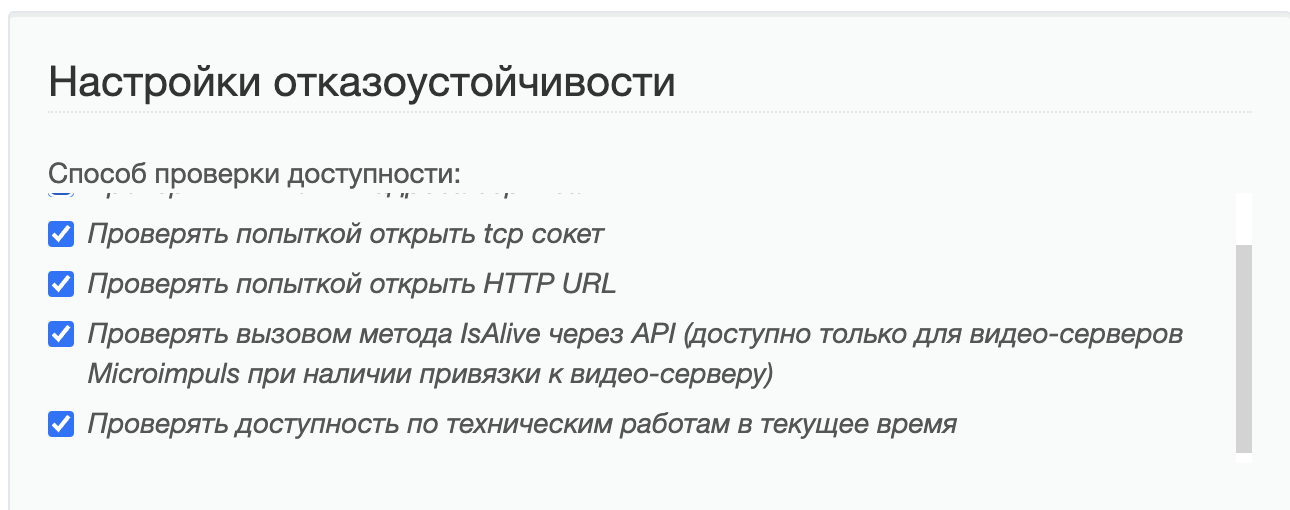
smarty_manage check_maintenances --client=1 --settings=settings.
The team makes the following arguments:
-client_id(number) is the ID of the client to be checked. If not specified, the inspection will take place on all customers.
The team gets the right to change the availability of stream services and channels after placing the corresponding checkbox in the fault tolerance settings of the streaming service:
Monitoring
Survey of flow monitoring module analyzers and accident alarm
Team:
smarty_manage check_streams --settings=settings.
It is recommended to run every 1-5 minutes for the current state of the data on the stream monitoring page.
Statistics
Collection and storage of statistics for each client
Team:
smarty_manage save_stats --settings=settings.
This team collects statistics on subscribers (the number of customers, the maximum number of online subscribers, the number of extended subscribers, the number of those who changed the base tariff, etc.) and statistics on transactions. The statistics can be viewed at: smarty.example.com/viewstats/customers_dynamic/.It is recommended to start the team once a day.
Collection of additional statistics for the report on the number of users
Team:
smarty_manage collect_daily_stats --settings=settings.
This team collects information that is used in payment reports, as well as in the charts “Payment today” and “Subscribers from whom payment was received” on the subscriber dynamics screen. The command must be run every day at the beginning of the day (record time is saved in UTC+0).
Maintaining the maximum number of online subscribers for statistics
Team:
smarty_manage cache_max_online --settings=settings.
This command checks the number of users online and stores it in cache if it is more than the previous value. The statistics can be viewed at:smarty.example.com/viewstats/customers_dynamic/. You can run a team with any regularity, but at least once a day.
Data caching for subscriber dynamics graphs
Team:
smarty_manage cache_customers_dynamic --settings=settings.
Parameters:
-client_id - a list of customer identifiers through a comma for which caching is necessary. If nothing is transferred to the argument, then the data is cached for all customers.
The team is recommended to run once an hour. For small bases, the charts will work quickly and correctly and without a given command. At the first run, the command can be executed for a long time (depending on the number of accounts, transactions and tariffs) due to the fact that the data for the entire previous month will be calculated. When restarting, data will only be calculated for the last day or hour (the cached data is not cached again). Since a command can take a long time to complete, it is recommended to try for a single client first.
Cleaning the database of storing statistics from old data in Smarty
Team:
smarty_manage reports_remove_old_data --settings=settings.
Parameters:
-days data older than this number of days should be cleaned.
-hours data older than this number of hours should be cleaned.
--force forced execution of commands, ignoring questions for the user.
The command allows you to delete the statistical data used for plotting, so as not to store data, for example, a year ago.
Deletion of old reports
Team:
smarty_manage delete_old_reports --save-days=30 --settings=settings;
Parameters:
-save-days the period of time in the days for which reports must be kept.
Data aggregation for advertising report
Team:
smarty_manage aggregate_ads_stats --date="2025-08-20" --settings=settings;
The team is recommended to run once a day.
Parameters:
-date The date for which the keys are aggregated. By default: previous day
-scan_chunk_size The portion size of the received keys from radish. The larger the portion, the faster the team works, but with a longer radish lock. Default: 10,000
-delete_chunk_size The portion size of the removed keys from the radish. The larger the portion, the faster the team works, but with a longer radish lock. Default: 10,000
delay The delay between removing key portions. Default: 1 second
-retries The number of attempts to delete a key. If the error occurs more than N times, the key is skipped and a record is added to the log. Default: 3 attempts to delete
-delay_after_errors Delay after exceeding the number of attempts to delete one key. Default: 3 seconds
